
A personal account is the gateway to everything the platform offers — casino games, sports betting, bonuses and withdrawals all sit behind it. The good part is that Greatwin registration process takes only two or three minutes from the first click to the last. Once you create an account, the full site opens up and you can fund your balance straight away. This guide takes you through who qualifies, how to fill in each part of the sign-up form, how to log in for the first time and what verification actually involves. By the end you will have a working personal account and a clear picture of every step, with no filler in between.
Who Can Open an Account at GreatWin?
Not everyone can sign up, so checking your eligibility early saves you from hitting a wall during verification later. Greatwin Casino keeps its rules simple: you need to be old enough, in a permitted location and honest with the details you give. Because accounts are matched against official documents, the information you enter now should line up with what you can prove afterwards. Keep in mind that you alone are responsible for knowing whether it is legal to gamble online in your own country.
- You must have reached the legal age of 18 or older.
- You must live in a jurisdiction where the platform is allowed.
- You must register under your real name with accurate contact details.

Registration Rules and Restrictions
The site sets clear limits to protect both the platform and the players who play fair. Each restriction is spelled out in the terms and conditions, so here are the ones worth knowing before you sign up.
- The platform allows one account per person, tied to a single address, email, phone number and IP.
- Opening a second profile creates a duplicate account, and every action taken through it is treated as void.
- Bonuses linked to that extra profile are cancelled, and any winnings from it are removed.
- The second profile is closed for good, with no option to reopen it.
- Selling, buying or handing an account to another person is forbidden outright.
- Players from excluded jurisdictions cannot register or add funds at all.
How to Register at Greatwin Casino Site
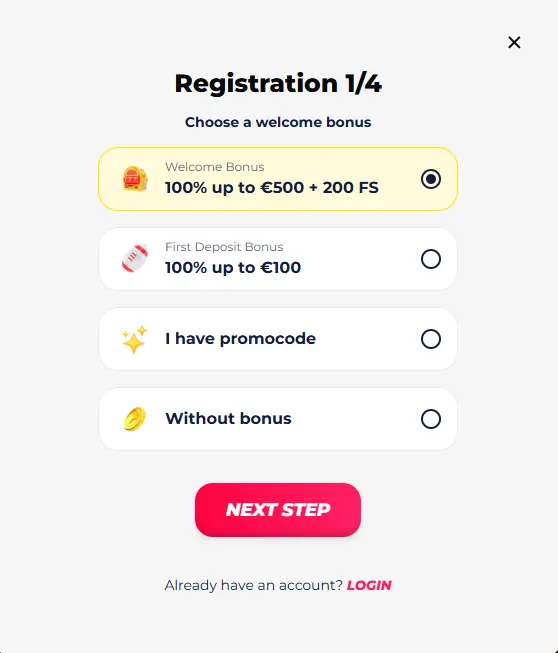
Signing up runs as a short sequence of steps, and it all starts on the official site. Head there and click the “Register” button to open the registration form. From there, GreatWin walks you through a few quick screens — bonus choice, login details, personal information and contact data. Let’s go through each screen below so you know exactly what to enter and why it counts.
Select a Welcome Bonus
The first step is the pleasant one — picking how you want to start. You can take the casino welcome bonus of 100% up to €500 plus 200 free spins, or go with the sports first deposit bonus of up to 100% up to €100. If you have a valid Greatwin promo code, enter it here to boost what lands in your account. And if you would rather play on your own terms, the “Without bonus” option lets you skip the offer entirely.
Create Secure Login Credentials
This screen sets up the details you will use for a long time, so it pays to slow down. You enter your email, choose a login (username) and set a password, then confirm you are 18 or older and accept the terms and conditions before tapping “Next step”. Pick a password that mixes letters, numbers and symbols — strong login credentials are the first line of defence for your money. Avoid anything you already use elsewhere, since a reused password is the easiest one to lose.
Enter Your Personal Details
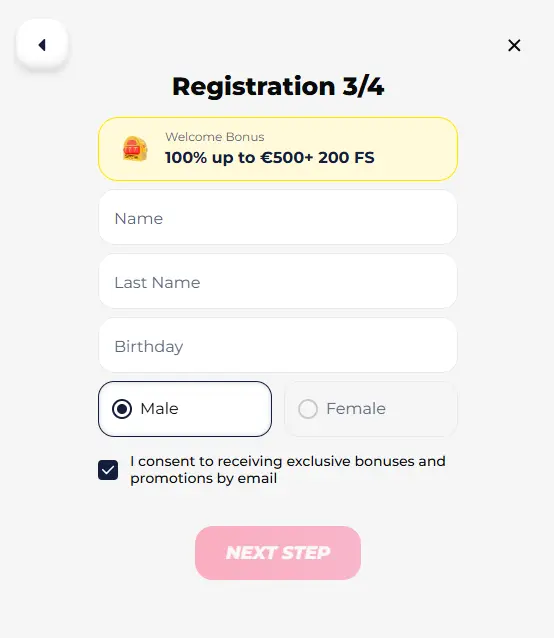
The details you give here should match your documents exactly, or you will trip up later at verification. Fill in your first name, last name, date of birth and sex (male or female), making sure your personal data matches your ID rather than a nickname or shortened version. A correct name now means a smooth check afterwards, so double-check the spelling before you move on. Once everything looks right, click the “Next step” button to continue.
Enter Your Contact Details
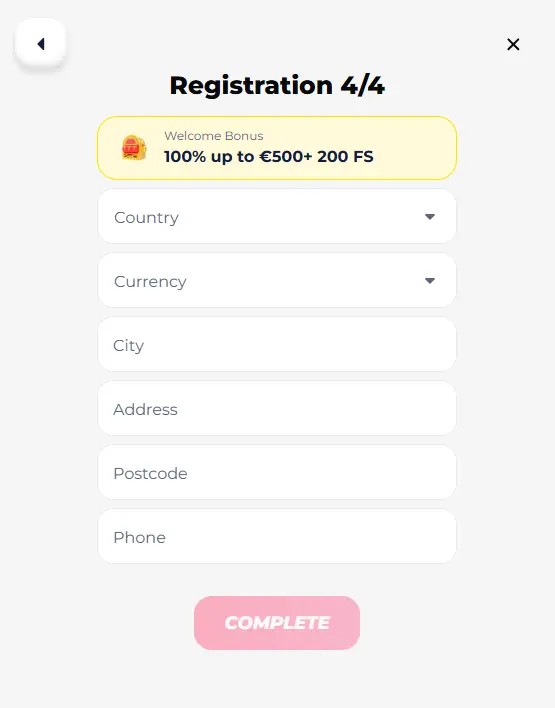
Every detail on this screen should be current, because your phone and address come back into play at verification and withdrawal. Choose the currency you want to bet in, then enter your country and city of residence along with your current address and postcode. Add the contact details you actually use day to day, including the mobile phone number on the device in your hand right now. It is worth taking a moment to keep details up to date here, since an old number or address can hold up a payout later.
Complete the Account Creation
The last step is a quick review before you confirm. Look over the account details you have entered — name, contact data and currency — and make sure nothing is mistyped, then click “Complete” to complete Greatwin registration. A short double-check here saves real time later, since clean data means fewer holdups at verification and a smoother first log in.
How to Log In to Your Account After Signing Up
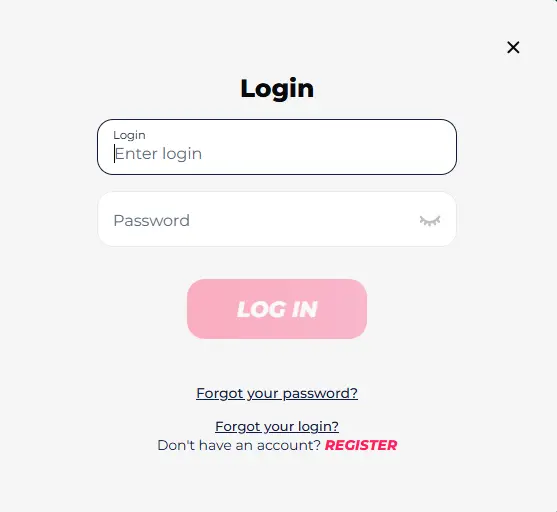
With your account ready, signing in takes just a few seconds. Here is how to log in to Greatwin:
- Open the login page on the site.
- Enter your username or email address.
- Type in your password.
- Click the “Log In” button.
Get your login and password right and account login is instant — you land straight on the player dashboard, where you can top up your balance and start your gaming session.
Identity Verification and Security Checks
Verification is a required step for everyone, not a hurdle aimed at a few — pass it and you unlock the full range of services, withdrawals included. During identity verification, Greatwin confirms three things: who you are, that you are old enough to play, and where your money comes from. This is the standard KYC procedure, and the checks can happen either before or after you deposit or request a payout. In some cases the team runs extra security checks, such as a phone call or face verification, to be sure the account really belongs to you. You have 30 days to send in your documents once asked, and the review usually wraps up within ten days, though tricky cases can take a little longer.
What Documents Are Needed for Verification
A little preparation makes this painless — here is what to have ready before you start the document upload:
- A valid identity document, such as an ID card or passport.
- Proof of address, like a recent utility bill or bank statement.
- Proof that the payment method is yours, for example a card or account statement.
Once you send your verification documents, the check normally clears within 24 hours and takes 72 hours at the very most. Uploading clean, readable copies the first time is the surest way to keep that window short.
Mobile Registration on Greatwin
Plenty of players sign up straight from their phone, and the process sits in exactly the same place. There is no separate casino app, so mobile registration follows the identical steps described above. The Greatwin mobile site brings more than just quick registration to the table:
- An interface adapted to fit every mobile device.
- Instant access to your account from your phone.
- The simple convenience of signing up and playing right away.
Because everything runs in the browser, you skip downloads and updates entirely and move from registration to your first spin in one sitting.

New Account Management Actions
A fresh account is something you look after, not something you set up and forget. Greatwin account management puts a handful of useful controls in your hands:
- Keep your personal and contact details current whenever something changes.
- Change your password from time to time to keep access secure.
- Close account on request, provided the balance is zero and no withdrawals are pending.
- Request self-exclusion through customer support if you need a break.
Treat these tools as part of playing responsibly — setting your own limits and stepping away when it feels right keeps the experience healthy rather than a chore.
Main Sign Up Problems and Solutions
Most Greatwin registration problems are small and quick to fix — here is what tends to come up and how to sort it out:
- No confirmation email → check your spam folder first, then resend the message or contact support if it still hasn’t arrived.
- You can’t log in → use the “forgot password” or “forgot login” link to start password recovery by email and reset your access in a minute.
- Account paused before verification → send your documents so the review can finish and full access opens up.
- Sign-up refused → this usually points to a duplicate account or a restricted country; customer support can confirm the reason.
When anything looks unclear, a short message to support settles it faster than guessing on your own.